Wednesday, March 23, 2011

How To Catch your Invisible Friends on Google Talk

Ever wondered if one of your friends who always remained invisible on gtalk could be caught....
Yes friend.. you can catch him/her.
Just follow these simple steps to catch your invisible friend.

Step 1 : Use Google talk application.(Gmail does not work for me... dont ask me why).

Step 2 : Click on your friend's name to open a chat window.
It will show your friend as offline.
Step 3 : Click on the arrow pointing down on the top left corner and select "Go off the record"
It would show the window something like this :

Going 'Off the record' does not save the chat in your chat history.. nothing else changes.

Step 4 :
Now say hi to your friend...
Now... Notice the text in red saying my friend is offline...
Indeed my friend is offline here.

If he was online and invisible, the window would have looked like this.

Notice the text in red saying my friend is offline is missing here...
This means my friend in online and is invisible.
This is a bug that google has not fixed for a long time.
Exploit it !!!!
And dont forget it say it loud... That Was simple !!!!
Cheers
100rabh

Sunday, February 6, 2011

How to recall a sent email from MS Outlook 2007

So...
u sent an email from your outlook to someone you did not intend to... and now you are cribbing and you wish there was a time machine that you could use and get that email back .. or even change it with a new email.
read on....

YES, you can recall your email using outlook...
Follow these 3 simple steps, and you can rectify your mistake (without inventing a time machine)
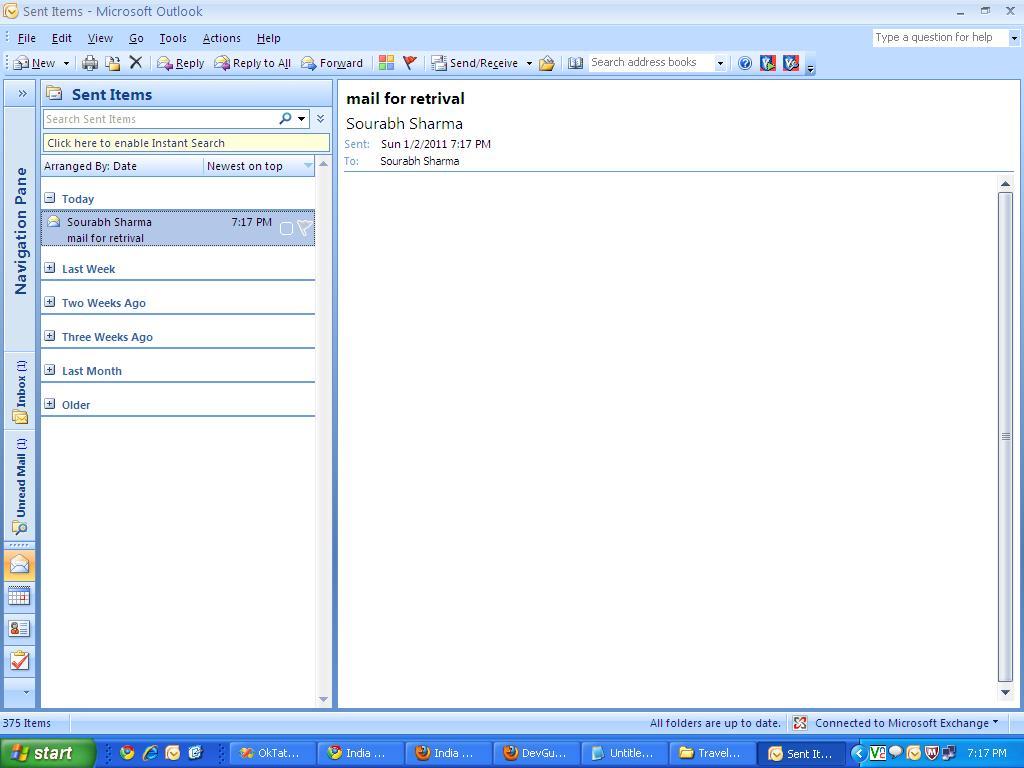
Step 1 : Go to sent items in your outlook..
 Step 2: find the mail you want to retrieve, and open it.
Click on other options from the top menu and select the option that says recall this msg...
 Step 3: There would be a pop up asking about the action choice
a: Delete unread copies of this message.
b: Delete unread copies and replace with a new message.
the checkbox below these options are optional but i recommend that you check it
Select the option you want and select OK
and you are done...
thats called
That Was Simple !!!
Note : if you checked the checkbox i recommended in step 3, you will get a success or failure notice like this :


Success


Sunday, January 9, 2011

How to run SQL server management studio 2005 for the first time.

So.. you have installed SQL server management studio...
Congrats. but now what to do....???
Read on....
Here are easy steps to run your studio for the first time.
  1. Open sql server management studio from the start menu. I will show you the login Screen.
     2.    Out of 3 options, select Databse engine in the first option. Enter your Computer Name in the second one. And  select Windows Authentication in the third option.
    3.    Click Connect...(And u r flying..)   
In Some cases, you may get this following error...
or an error saying you are not authorised to make database.. in that case, close the SQL server management studio and open it again, this time right click on the sql server management studio and select the option that says "Run as administrator".

its that simple !!
until next time..
keep clicking !!!
100rabh

Tuesday, December 28, 2010

How to Run TurboC in full screen on Windows Vista

I learnt C and C++ programming on windows 98 and have worked on windows XP, which showed a full screen turboC window to work on.(and cheat during exams).
But today’s leading operating systems like Vista (32 bit) do not support a full screen view of turbo C. There is a very simple 5 step solution that will make our Turbo C / C++ screen full screen and running.
  1. Open tc.exe from c:/tc/bin/tc.exe.
  2. It may show you a warning message that it does not support full screen mode, click ignore. 

     3. On the top left corner of this small turbo c window, left click with your mouse and select properties from the menu and then select Font tab. There will be only 2 options in the font tab: ‘Raster’ and ‘Lucida Console’.


     4.  Select and ‘Lucida Console’ font if it’s not selected and set the font size to 28.

     5.  Next, Select the Layout tab and do the following:
  •    Unselect ‘Let system position window’ check box. 
  •    Set Screen Buffer Size: Width 82 and Height 28. 
  •    Set Window Size: Width 80 and Height 26. 
  •    Set Window Position: Left: -4 Top: -4 

And you are ready to code... Happy coding!!!
Note that these numbers i gave you suit me and my laptop's settings, you can play around with them to get the best result for your computer. 
PS: If you don’t have Turbo C setup, click here to download it Now or mail me at idontloveu@gmail.com to get a copy of turboC .

Sunday, December 26, 2010

How to add Northwind databse to sql server 2005

Hi Everybody,
Northwind database is a free sample database provided by Microsoft and is a really nice practice database. it covers almost all the aspects of sql queries that you may ever encounter.
if you are using sql server 2005 management studio, you dont get Northwind by default.
so here is a quick 4 step guide to install Northwind into SQL server 2005 management studio.
Step 1. Click here to download Northwind.msi.
Step 2. Run and install the downloaded file.
Step 3. The installation will make a C:\SQL Server 2000 Sample Databases folder, open sql server 2005, click on file>>Open>>file>> and point it to a file called instnwnd.sql at the location mentioned above. 


Step 4. It will open a huge query file in the sql server, now just press f5 to execute this and the northwind database will be ready in your object explorer.
Happy practicing !!!

Wednesday, March 23, 2011

How To Catch your Invisible Friends on Google Talk

Ever wondered if one of your friends who always remained invisible on gtalk could be caught....
Yes friend.. you can catch him/her.
Just follow these simple steps to catch your invisible friend.

Step 1 : Use Google talk application.(Gmail does not work for me... dont ask me why).

Step 2 : Click on your friend's name to open a chat window.
It will show your friend as offline.
Step 3 : Click on the arrow pointing down on the top left corner and select "Go off the record"
It would show the window something like this :

Going 'Off the record' does not save the chat in your chat history.. nothing else changes.

Step 4 :
Now say hi to your friend...
Now... Notice the text in red saying my friend is offline...
Indeed my friend is offline here.

If he was online and invisible, the window would have looked like this.

Notice the text in red saying my friend is offline is missing here...
This means my friend in online and is invisible.
This is a bug that google has not fixed for a long time.
Exploit it !!!!
And dont forget it say it loud... That Was simple !!!!
Cheers
100rabh

Sunday, February 6, 2011

How to recall a sent email from MS Outlook 2007

So...
u sent an email from your outlook to someone you did not intend to... and now you are cribbing and you wish there was a time machine that you could use and get that email back .. or even change it with a new email.
read on....

YES, you can recall your email using outlook...
Follow these 3 simple steps, and you can rectify your mistake (without inventing a time machine)
Step 1 : Go to sent items in your outlook..
 Step 2: find the mail you want to retrieve, and open it.
Click on other options from the top menu and select the option that says recall this msg...
 Step 3: There would be a pop up asking about the action choice
a: Delete unread copies of this message.
b: Delete unread copies and replace with a new message.
the checkbox below these options are optional but i recommend that you check it
Select the option you want and select OK
and you are done...
thats called
That Was Simple !!!
Note : if you checked the checkbox i recommended in step 3, you will get a success or failure notice like this :


Success


Sunday, January 9, 2011

How to run SQL server management studio 2005 for the first time.

So.. you have installed SQL server management studio...
Congrats. but now what to do....???
Read on....
Here are easy steps to run your studio for the first time.
  1. Open sql server management studio from the start menu. I will show you the login Screen.
     2.    Out of 3 options, select Databse engine in the first option. Enter your Computer Name in the second one. And  select Windows Authentication in the third option.
    3.    Click Connect...(And u r flying..)   
In Some cases, you may get this following error...
or an error saying you are not authorised to make database.. in that case, close the SQL server management studio and open it again, this time right click on the sql server management studio and select the option that says "Run as administrator".

its that simple !!
until next time..
keep clicking !!!
100rabh

Tuesday, December 28, 2010

How to Run TurboC in full screen on Windows Vista

I learnt C and C++ programming on windows 98 and have worked on windows XP, which showed a full screen turboC window to work on.(and cheat during exams).
But today’s leading operating systems like Vista (32 bit) do not support a full screen view of turbo C. There is a very simple 5 step solution that will make our Turbo C / C++ screen full screen and running.
  1. Open tc.exe from c:/tc/bin/tc.exe.
  2. It may show you a warning message that it does not support full screen mode, click ignore. 

     3. On the top left corner of this small turbo c window, left click with your mouse and select properties from the menu and then select Font tab. There will be only 2 options in the font tab: ‘Raster’ and ‘Lucida Console’.


     4.  Select and ‘Lucida Console’ font if it’s not selected and set the font size to 28.

     5.  Next, Select the Layout tab and do the following:
  •    Unselect ‘Let system position window’ check box. 
  •    Set Screen Buffer Size: Width 82 and Height 28. 
  •    Set Window Size: Width 80 and Height 26. 
  •    Set Window Position: Left: -4 Top: -4 

And you are ready to code... Happy coding!!!
Note that these numbers i gave you suit me and my laptop's settings, you can play around with them to get the best result for your computer. 
PS: If you don’t have Turbo C setup, click here to download it Now or mail me at idontloveu@gmail.com to get a copy of turboC .

Sunday, December 26, 2010

How to add Northwind databse to sql server 2005

Hi Everybody,
Northwind database is a free sample database provided by Microsoft and is a really nice practice database. it covers almost all the aspects of sql queries that you may ever encounter.
if you are using sql server 2005 management studio, you dont get Northwind by default.
so here is a quick 4 step guide to install Northwind into SQL server 2005 management studio.
Step 1. Click here to download Northwind.msi.
Step 2. Run and install the downloaded file.
Step 3. The installation will make a C:\SQL Server 2000 Sample Databases folder, open sql server 2005, click on file>>Open>>file>> and point it to a file called instnwnd.sql at the location mentioned above. 


Step 4. It will open a huge query file in the sql server, now just press f5 to execute this and the northwind database will be ready in your object explorer.
Happy practicing !!!